HP LaserJet Pro MFP M329, M428, M429 - Printer specifications
HP LaserJet Pro MFP M329, M428, M429 - Printer specifications

Technical specifications
Review the technical specifications for the printer.
Product numbers for each model
-
M329dn - #W1A23A
-
M329dw - #W1A24A
-
M428dw - #W1A28A, #W1A31A
-
M428fdn - #W1A29A, #W1A32A
-
M428fdw - #W1A30A
-
M429dw - #W1A33A
-
M429fdn - #W1A34A
-
M429fdw - #W1A35A
|
Paper handling features
|
M428dw
M429dw
|
M428fdn
M429fdn
|
M428fdw
M429fdw
|
M329dn
|
M329dw
|
|
Tray 1 (100-sheet capacity)
|

|
|
|
|
|
|
Tray 2 (250-sheet capacity)
|
|
|
|
|
|
|
Optional 550-sheet accessory tray
|
Optional
|
Optional
|
Optional
|
Optional
|
Optional
|
|
Automatic duplex printing
|
|
|
|
|
|
|
Connectivity features
|
M428dw
M429dw
|
M428fdn
M429fdn
|
M428fdw
M429fdw
|
M329dn
|
M329dw
|
|
10/100/1000 Ethernet LAN connection with IPv4 and IPv6
|
|
|
|
|
|
|
Hi-Speed USB 2.0
|
|
|
|
|
|
|
Walk-up USB port
|
|
|
|
|
|
|
Print server for wireless connectivity
|
|
Not available
|
|
Not available
|
|
|
Bluetooth Low Energy (BLE)
|
|
Not available
|
|
Not available
|
|
|
Wi-Fi Direct for printing from mobile devices
|
|
Not available
|
|
Not available
|
|
|
Print features
|
M428dw
M429dw
|
M428fdn
M429fdn
|
M428fdw
M429fdw
|
M329dn
|
M329dw
|
|
Prints 35 pages per minute (ppm) on A4 and 37 ppm on
letter-size paper
|
Not available
|
Not available
|
Not available
|
|
|
|
Prints 38 pages per minute (ppm) on A4 and 40 ppm on
letter-size paper
|
|
|
|
Not available
|
Not available
|
|
Job storage and private printing
|
|
|
|
|
|
|
Copy and scan features
|
M428dw
M429dw
|
M428fdn
M429fdn
|
M428fdw
M429fdw
|
M329dn
|
M329dw
|
|
Copies and scans up to 32 pages per minute (ppm)
|
|
|
|
|
|
|
50-page document feeder with dual-head scanning for
single-pass duplex copying and scanning
|
Not available
|
|
|
Not available
|
Not available
|
|
50-page document feeder with simplex copying and scanning
|
|
|
|
|
|
|
Scan to E-mail, Scan to USB, and Scan to Network Folder
options
|
|
|
|
|
|
|
Other features
|
M428dw
M429dw
|
M428fdn
M429fdn
|
M428fdw
M429fdw
|
M329dn
|
M329dw
|
|
Color touchscreen control panel
|
|
|
|
|
|
|
Fax features
|
Not available
|
|
|
Not available
|
Not available
|
Supported operating systems
The following information applies to the printer-specific Windows and HP
print drivers for macOS and to the software installer.
Windows: The HP Software Installer installs either a
V3 or V4 PCL 6 print driver depending on the Windows operating system
along with optional software when using the full software installer. See
the software installation notes for more information.
macOS: Mac computers are supported with this
printer. Download HP Easy Start either
from 123.hp.com/LaserJet or from the Printer Support page, and
then use HP Easy Start to install the HP print driver. HP Easy Start is
not included in the HP Software Installer.
-
Go to 123.hp.com/LaserJet.
-
Follow the steps provided to download the printer software.
Linux: For information and print drivers for Linux,
go to www.hp.com/go/linuxprinting.
UNIX: For information and print drivers for UNIX, go
to www.hp.com/go/unixmodelscripts.
|
Operating system
|
Print driver installed (from the software on the web)
|
|
Windows 7, 32-bit and 64-bit
|
The HP PCL 6 (V3) printer-specific print driver is installed
for this operating system as part of the software
installation.
|
|
Windows 8, 32-bit and 64-bit
|
The HP PCL 6 (V3) printer-specific print driver is installed
for this operating system as part of the software
installation.1
|
|
Windows 8.1, 32-bit and 64-bit
|
The HP PCL-6 (V4) printer-specific print driver is installed
for this operating system as part of the software
installation.2
|
|
Windows 10, 32-bit and 64-bit
|
The HP PCL-6 (V4) printer-specific print driver is installed
for this operating system as part of the software
installation.
|
|
Windows Server 2008 R2, 64-bit
|
The HP PCL 6 (V3) printer-specific print driver is available
for download from the printer support website. Download the
driver, and then use the Microsoft Add Printer tool to install
it.3
|
|
Windows Server 2008 R2, SP1, 64-bit
|
The HP PCL 6 (V3) printer-specific print driver is available
for download from the printer support website. Download the
driver, and then use the Microsoft Add Printer tool to install
it.
|
|
Windows Server 2012
|
The HP PCL 6 (V3) printer-specific print driver is available
for download from the printer support website. Download the
driver, and then use the Microsoft Add Printer tool to install
it.
|
|
Windows Server 2012 R2
|
The HP PCL 6 (V3) printer-specific print driver is available
for download from the printer support website. Download the
driver, and then use the Microsoft Add Printer tool to install
it.
|
|
Windows Server 2016, 64-bit
|
The HP PCL 6 (V3) printer-specific print driver is available
for download from the printer support website. Download the
driver, and then use the Microsoft Add Printer tool to install
it.
|
|
macOS Sierra v10.12, macOS High Sierra v10.13, macOS
Mojave v10.14
|
To install the print driver, go
to 123.hp.com/LaserJet and download HP Easy
Start. Follow the onscreen instructions to install the printer
software and print driver.
|
1Windows 8 RT support is provided through Microsoft IN OS
Version 4, 32-bit driver.2Windows 8.1 RT support is provided
through Microsoft IN OS Version 4, 32-bit driver.3Microsoft
retired mainstream support for Windows Server 2008 in January 2015. HP
will continue to provide best effort support for the discontinued Server
2008 operating system.
|
Windows 10, 8.1, 8, 7
|
macOS Mojave v10.14, macOS High Sierra v10.13, macOS Sierra
v10.12
|
Mobile devices, iOS, Android
|
|
|
Router connection not required
www.hp.com/go/mobileprinting
|
Mobile printing solutions
HP offers multiple mobile and ePrint solutions to enable easy printing to
an HP printer from a laptop, tablet, smartphone, or other mobile device.
To see the full list and to determine the best choice, go
to www.hp.com/go/MobilePrinting.
The printer supports the following software for mobile printing:
-
Wi-Fi Direct (wireless models only)
-
Bluetooth Low Energy
-
HP Smart app for iOS and Android devices
-
Google Cloud Print
-
AirPrint
-
Android Printing
-
HP Roam
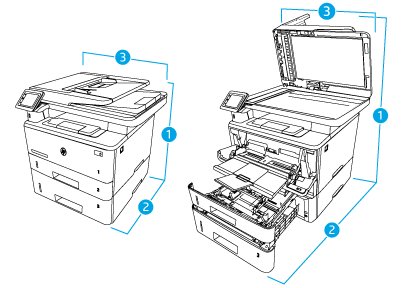
Printer dimensions
Make sure your printer environment is large enough to accommodate the
printer.
|
Measurement
|
Printer fully closed
|
Printer fully opened
|
|
1. Height
|
323 mm
|
577 mm
|
|
2. Depth
|
390 mm
|
839 mm
|
|
3. Width
|
420 mm
|
453 mm
|
|
Weight (with cartridges)
|
12.9 kg
|
12.9 kg
|

|
Measurement
|
Tray fully closed
|
Tray fully open
|
|
1. Height
|
131 mm
|
131 mm
|
|
2. Depth
|
357 mm
|
781 mm
|
|
3. Width
|
381 mm
|
381 mm
|
|
Weight
|
3.7 kg
|
3.7 kg
|
|
Measurement
|
Printer fully closed
|
Printer fully opened
|
|
1. Height
|
452 mm
|
706 mm
|
|
2. Depth
|
390 mm
|
839 mm
|
|
3. Width
|
420 mm
|
453 mm
|
|
Weight (with cartridge)
|
16.6 kg
|
16.6 kg
|
Power consumption
Review the power consumption for each printer status or function.
|
Printing
|
Ready
|
Sleep
|
Auto-Off
|
Enabled at shipment
|
Off
|
|
510 W
|
7.5 W
|
0.9 W
|
0.9 W
|
0.06 W
|
0.06 W
|
Electrical specifications
Review the electrical specifications for the printer.
NOTE:Power requirements are based on the country/region where the printer is sold. The values in the following table are subject to change.
CAUTION:Do not convert operating voltages. This can damage the printer and void the printer warranty.
|
Specification
|
110-volt models
|
220-volt models
|
|
Power requirements (Volts)1
|
100 to 127 volts (± 10%)
50/60 Hz (± 3 Hz)
|
220 to 240 volts (± 10%)
50/60 Hz (± 3 Hz)
|
1Power reported is highest value measured for all printer
models using standard voltages.
Acoustic emissions
Review the acoustic emissions, including sound power level and sound
pressure level.
|
Acoustics: Sound power level (pages per minute (ppm))
|
Declared per ISO 9296
|
|
Printing (38 ppm)
|
LwAD = 6.7 Bels(A)
|
|
Copying
|
LwAD = 6.8 Bels(A)
|
|
Scanning
|
LwAD = 6.3 Bels(A)
|
|
Ready
|
Inaudible
|
|
Acoustics: Sound pressure level (pages per minute (ppm))
|
Declared per ISO 9296
|
|
Printing (38 ppm)
|
LpAm = 53 dB(A)
|
|
Copying
|
LpAm = 54 dB(A)
|
|
Scanning
|
LpAm = 48 dB(A)
|
|
Ready
|
Inaudible
|
Operating environment range
Review the recommended operating-environment specifications for your
printer.
|
Environment
|
Recommended
|
Allowed
|
|
Temperature
|
17.5° to 25°C
|
15° to 32.5°C
|
|
Relative humidity
|
30% to 70% relative humidity (RH)
|
10% to 80% RH
|
https://support.hp.com/

Comments
Post a Comment